Use case credit
Ken Doble @kdoble
Ken Doble (@kdoble) shared how 23 emailed PMS reports feed an owner dashboard they can change, set up with Claude computer use, in a post on X on Oct 5, 2026.
The Property Management Reporting Problem: A Dashboard the Owner Can't Change
Ken Doble's post starts with a familiar limit. "My PMS software has a dashboard. I can look at it. I can't change it. Changing it takes an expert, an invoice, and somebody else's permission."
On business intelligence tools, Doble writes: "The license is cheap: Power BI Pro runs $14 a user a month." But they cite one Power BI consulting firm that "prices a small company's first few dashboards at $5,000 to $25,000 and puts more than half of that on data engineering, getting the data out of your systems and into shape."
And the data is the hard part for an owner: "As the owner, I don't get a data feed. I get a login that can look at reports and schedule them."
How the Property Management Reporting Pipeline Works
Property Management Reporting by Scheduled Email
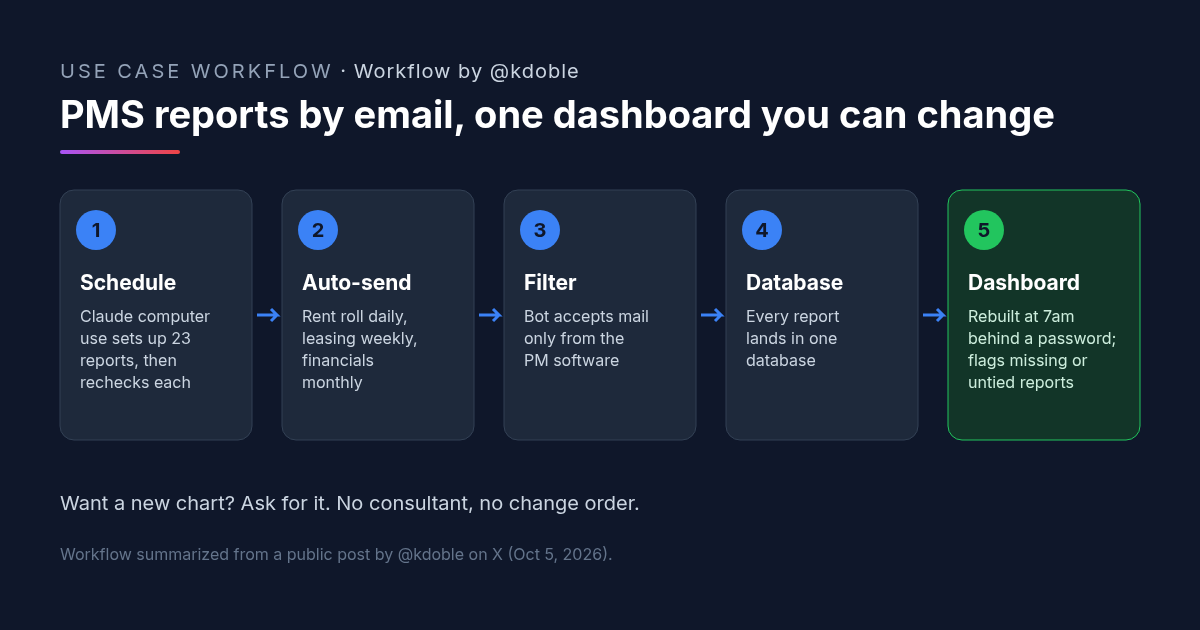
"So I used what I had. Email. 23 reports now go out on auto-send to a bot. Rent roll and pre-lease every day, leasing and work orders every week, financials every month."
Property Management Reporting Into One Database
"The bot accepts mail that really comes from the PM software and nothing else, drops the reports into one database, and every morning at 7 it rebuilds the dashboard behind a password."
Property Management Reporting That Admits Gaps
"If a report doesn't show up or doesn't tie out, the dashboard says so instead of guessing."
The post doesn't name the PMS, the database or the tool that runs the bot, so we don't either.
Claude Computer Use Set Up the Property Management Reporting Schedules
Doble calls the setup "the coolest part." Computer use, "where the AI drives the mouse and keyboard, used to be clunky and slow. This time I pointed Claude Opus 5.5 at my browser, logged in to my owner account, and went to work on other projects, and it built a schedule for every one of those reports, picked the dates, picked the file format, pointed every one at the bot, and then it went back and reopened every single one and checked it field by field."
Changes are now a request. "Want a new chart? I ask for it. Last week I told it to rip out the auto-generated to-do list. Gone. No consultant, no change order, and no extra cost on top of the Claude subscription."
This differs from our owner statement article, where a Claude skill merges a manager's statements with the bookkeeper's files into a monthly PDF. Doble's setup is a live dashboard fed by daily, weekly and monthly report emails.
Why Email Works for Property Management Reporting
- It uses access the owner already has. Scheduling reports is something the owner login allows. No vendor approval or integration project.
- One sender, one inbox. Accepting mail only from the PM software keeps stray or spoofed files out of the database.
- Gaps are visible. A dashboard that says a report is missing is more useful than one that quietly shows old numbers.
- The AI checked its own setup. Reopening every schedule field by field is the step that makes a 23-report setup trustworthy.
Doble closes with Charlie Munger: "Wesco continues to try more to profit from always remembering the obvious than from grasping the esoteric."
How to Try It: A Property Management Reporting Setup Prompt
Doble didn't publish prompts. This CRE AI Studio add-on is for the first step: an inventory of the reports your owner login can schedule. Run it with a computer-use tool on a screen where you're already signed in, and review the plan before it schedules anything.
[CRE AI Studio prompt, written for this article]
I'm signed in to my owner account in our property management software. Do not change anything yet.
1. List every report this login can schedule by email. For each: report name, available formats, and frequency options.
2. Propose a schedule: rent roll and pre-lease daily, leasing and work orders weekly, financials monthly, plus anything else you'd add and why.
3. All schedules will go to [BOT INBOX ADDRESS] in [FORMAT].
Show me the plan as a table and wait for my approval.
After I approve: create each schedule, then reopen every one and check it field by field (report, dates, format, recipient). Give me a final table showing each schedule and whether it passed your check.What to Check in an AI Property Management Reporting Setup
- Sender filtering. Confirm the inbox rejects mail that doesn't come from the PMS.
- Tie-outs. Decide which totals must match across reports, and test that a mismatch shows on the dashboard.
- Missing-report alerts. Skip one scheduled report on purpose and confirm the dashboard flags it.
- Access. The dashboard holds tenant and financial data. Keep it behind a password, as Doble does, and limit who has it.
- Session control. Watch the first computer-use session, and sign out of the owner account when it's done.
FAQ: Property Management Reporting by Email
How do you get property management reporting out of a PMS without a data feed?
Which reports go into this property management reporting setup?
What does Claude computer use do in this property management reporting workflow?
How does this property management reporting dashboard handle missing data?
More AI use cases
All use cases →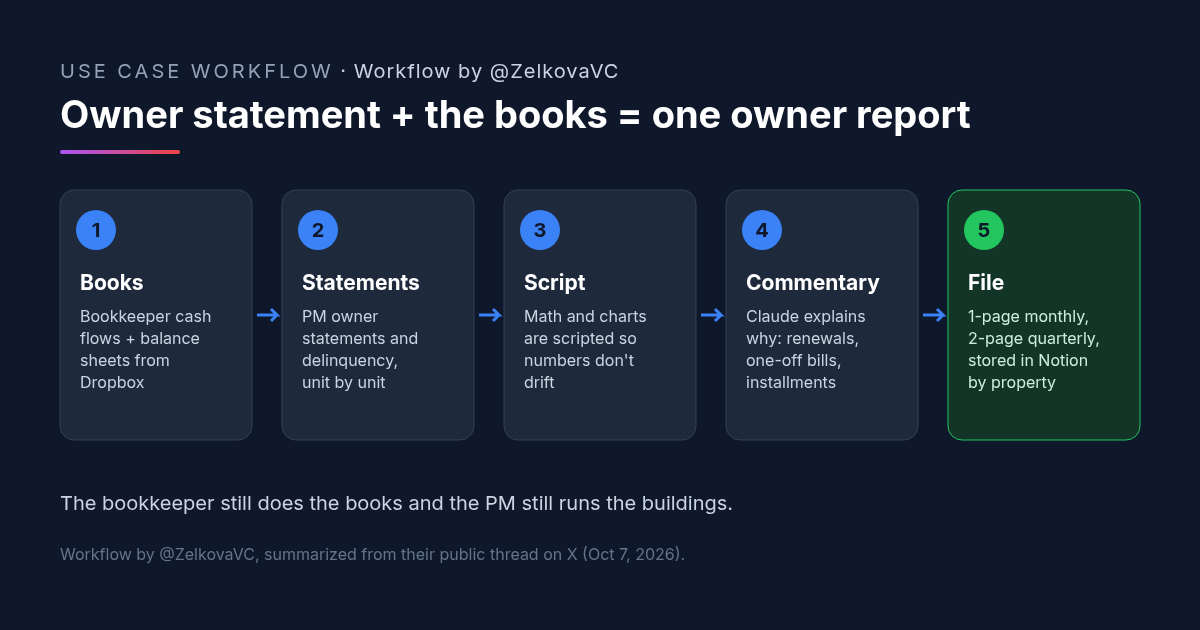
Owner Statement Plus Bookkeeper Financials: A Claude Skill That Builds One Owner Report
A rental owner's Claude skill merges the property manager's owner statement with the bookkeeper's financials into a one-page monthly owner report.
Credit: @ZelkovaVC · Oct 23, 2026 · 5 min read
Property Management Automation: n8n and Claude Route Maintenance Requests to Vendors
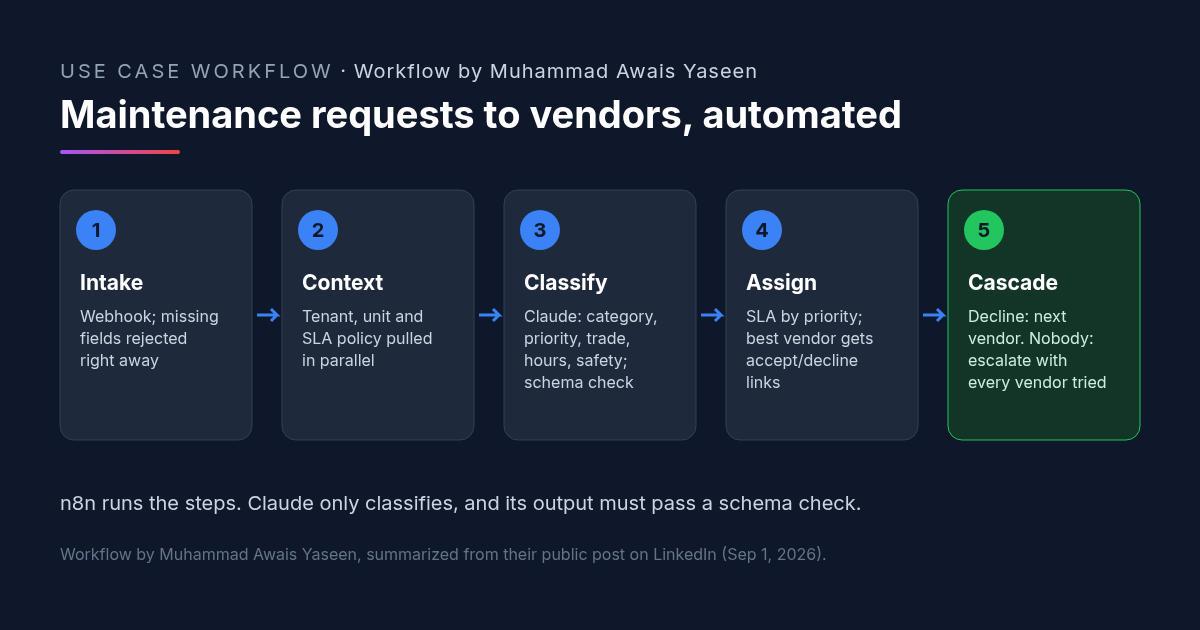
Property management automation for maintenance: n8n validates the request, Claude classifies it, the best vendor gets accept/decline links, declines cascade.
Credit: in/awais-yaseen-automation · Oct 23, 2026 · 6 min read
![Workflow by u/AccessSad9660: five-step diagram for a team late rent notice prompt. Step 1, pick the notice type from a list: entry, late rent, renewal, maintenance or lease violation. Step 2, paste the facts: amounts, dates, lease section. Step 3, fixed rules: neutral and factual, only the details given, [CHECK] instead of a guessed fee or deadline. Step 4, accommodation or health mentions are flagged to the manager, with fair housing rules. Step 5, an email with a subject line plus a For-the-manager checklist; a person checks local notice rules before sending.](/use-cases-images/late-rent-notice-ai-prompt.png)
Late Rent Notice Prompt: One AI Template So Every Manager Sends the Same Notice
A late rent notice AI prompt for property teams: pick the notice type, paste the facts, and the same neutral rules apply. [CHECK] replaces guessed fees.
Credit: u/AccessSad9660 · Oct 23, 2026 · 6 min read